
As an Amazon Associate I earn from qualifying purchases and sometimes recommend products from other sellers at no extra cost to you. For more details see my disclosure policy and privacy policy.
This post may contain affiliate links - I may make commission from any purchases.
If you’ve searched “best Cricut machine for beginners” recently, you’ve probably landed on a handful of posts still comparing the Joy, Explore Air 2, and original Maker like it’s 2021. Cricut quietly reshaped its whole line-up in February 2026, and the old three-tier framing doesn’t map onto what’s actually on shelves any more.
Here’s the good news: choosing between them is genuinely simpler than it looks once you sort machines by what you actually want to make, not by which one has the biggest badge on the box.
Table of Contents
The 2026 Cricut Line-up, Explained Simply
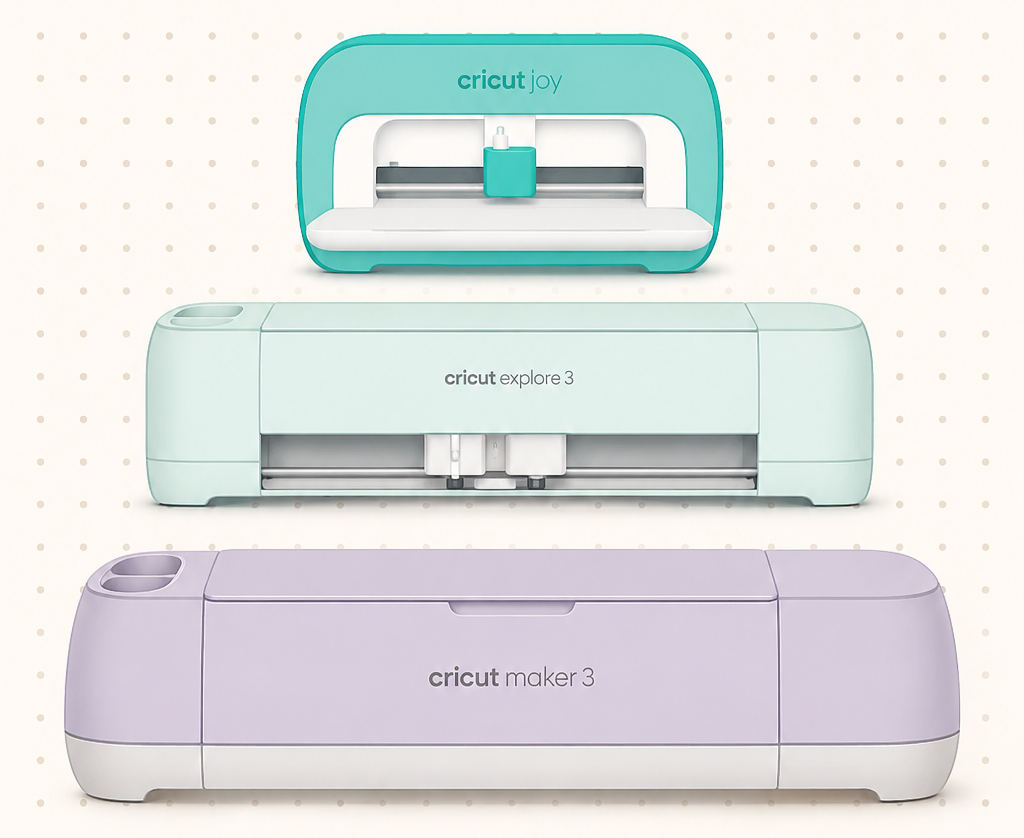
As of early 2026, Cricut sells five current machines, but only three matter for most beginners: the Joy 2, the Explore 5, and the Maker 4. (Joy Xtra and Venture exist too, but they serve narrower niches, more on that below.)
The Joy 2 and Explore 5 launched together on 27 February 2026, and both are around 30% smaller than the machines they replaced, with a simplified guided design process built into Cricut’s Design Space app. If you’ve felt intimidated by Design Space before, this redesign is worth knowing about; a lot of the beginner friction in older tutorials has been smoothed out.
Here’s the shortest possible version of what each machine does:
- Cricut Joy 2 – ultra-compact, cuts up to 4.25 inches wide, best for cards, labels, small decals, and (new for this generation) full-colour sticker printing via Print Then Cut.
- Cricut Joy Xtra – same compact footprint family, but handles wider projects like T-shirts and full-colour stickers that the standard Joy 2 can’t.
- Cricut Explore 5 – the general-purpose workhorse, 12-inch cutting width, handles vinyl, iron-on, cardstock, and most “everyday project” materials.
- Cricut Maker 4 – everything the Explore 5 does, plus fabric, leather, and thin wood, thanks to its rotary and knife blade tools.
- Cricut Venture – a wide-format professional machine for large-scale projects like signage. Overkill for almost every beginner, so we won’t cover it in depth here.
Match the Machine to What You Want to Make
This is the part most buying guides skip, and it’s the only question that actually matters: what are you planning to make in your first three months?
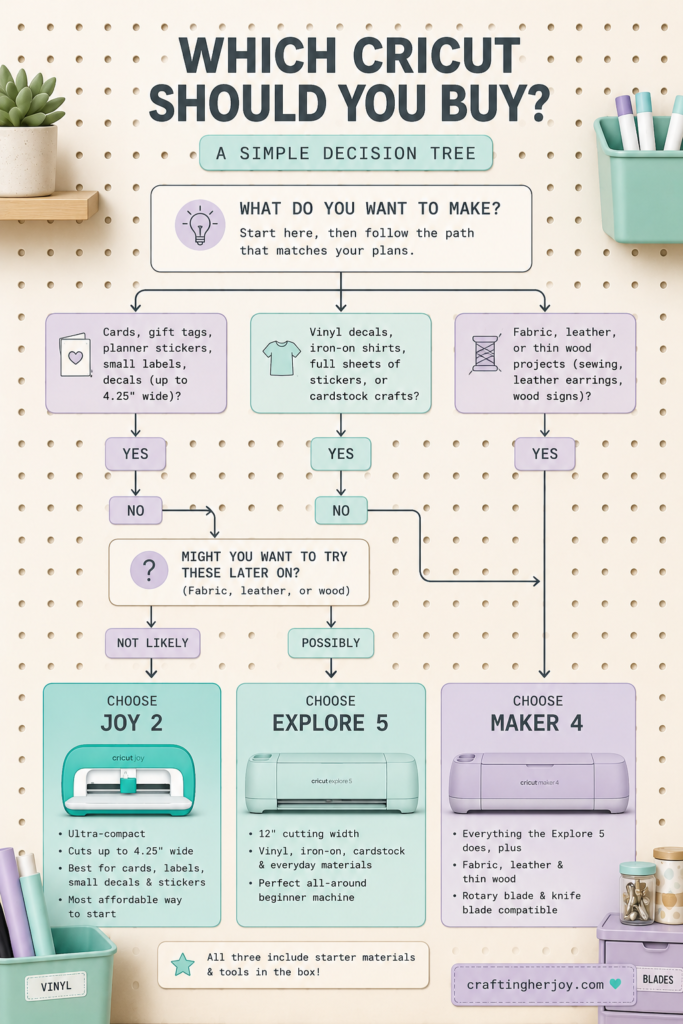
If your answer is mostly cards, gift tags, planner stickers, and small labels, the Joy 2 will cover you and it’s the cheapest way into the ecosystem. If you’re picturing vinyl decals, iron-on shirts, full sheets of stickers, or cardstock crafts, you’ll outgrow the Joy 2’s 4.25-inch width fast, and the Explore 5 is the better starting point.
And if fabric, leather, or wood are anywhere on your list (sewing projects, leather earrings, engraved-look wood signs), only the Maker 4 has the rotary and knife blades to cut them cleanly. The Explore 5 can score some of these materials, but it can’t cut them the way the Maker 4 can, so don’t buy an Explore 5 expecting Maker-level results on fabric or leather.
A practical way to decide: write down the first five projects you actually want to make. If none of them need fabric or leather, you probably don’t need to start with the Maker 4, even if it’s tempting as the “top” machine.
Price Versus Capability: What’s Worth Paying For
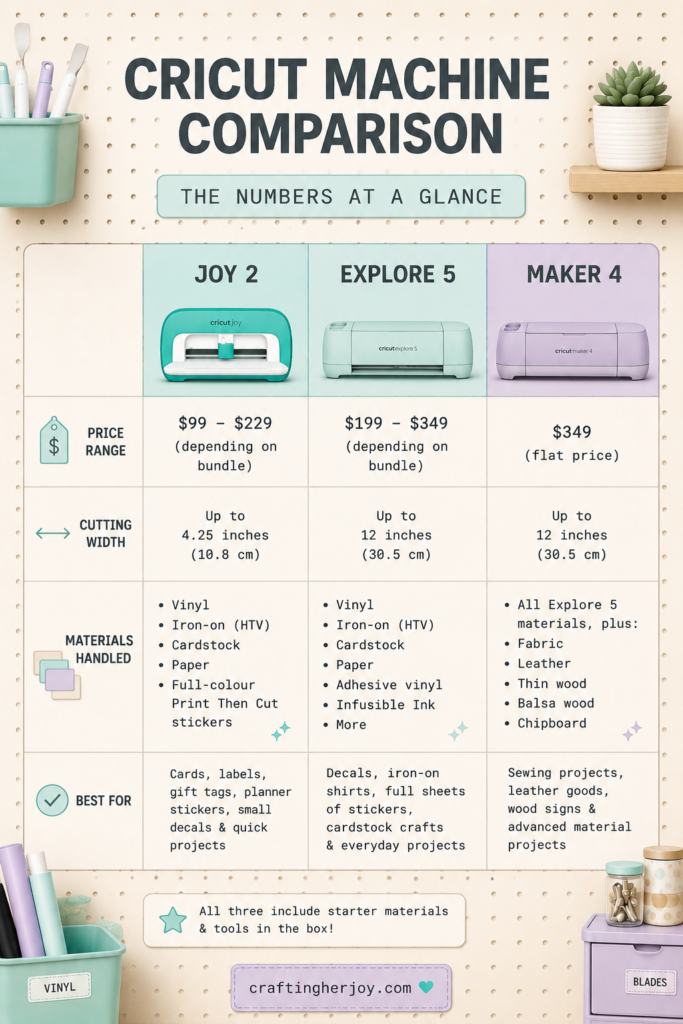
As of this year’s line-up, the Joy 2 starts at $99 and runs up to around $229 depending on the bundle, the Explore 5 starts at $199 and tops out near $349, and the Maker 4 sits at a flat $349. That’s a meaningfully wider spread than the old line-up, so the “just get the middle one” advice doesn’t really hold any more.
The jump from Joy 2 to Explore 5 buys you cutting width and material range. The jump from Explore 5 to Maker 4 buys you fabric, leather, and wood capability specifically, not a generally “better” machine. If you’re confident you’ll never touch those materials, that jump isn’t worth paying for yet. You can always add a Maker 4 later once you know your projects actually need it.
One more thing worth knowing before you buy: all three current machines ship with starter materials and tools in the box, which takes some of the “wait, what else do I need” surprise out of a first purchase.
Where Will It Actually Live?
This is the question beginners skip and then regret. A Cricut machine needs a flat surface with clearance behind it for the mat to feed through, plus somewhere nearby to store blades, mats, vinyl rolls, and whatever project you’re mid-way through.
The compact 2026 machines help here since they’re around 30% smaller than the previous generation, so even the Explore 5 and Maker 4 can work on a shared desk or a rolling cart rather than needing a dedicated craft room. But “smaller machine” doesn’t mean “no storage plan needed.” Mats warp if they’re stored badly, vinyl rolls take up more room than people expect, and loose blades are exactly the kind of thing that vanishes into a drawer.
If you’re setting up a workspace from scratch, our guide to keeping your craft room functional walks through setup and maintenance for exactly this kind of small-footprint crafting space. We’re also building out dedicated storage reviews for Cricut mats, blades, and vinyl specifically. In the meantime, the storage principles in our embroidery supply storage guide and knitting supply storage guide translate surprisingly well to Cricut consumables, since the core problem (lots of small supplies, easy to lose track of) is the same.
Common Beginner Buying Mistakes
A few patterns show up again and again in first-machine purchases:
- Buying the Maker 4 “to be safe.” If your actual project list doesn’t include fabric, leather, or wood, you’re paying for capability you won’t use yet.
- Underestimating material width needs. The Joy 2’s 4.25-inch limit is fine for cards and labels, but it rules out full sheet vinyl and most T-shirt transfers. Check your intended materials against the machine’s actual cutting width before you buy.
- Over-buying tools on day one. The bundled starter tools cover a genuine beginner’s first month. Resist the urge to buy every blade and accessory in the store before you know which ones your projects actually call for.
- Not planning for storage. See above. A brilliant machine on a cluttered desk still leads to lost blades and warped mats.
Keeping Your New Machine Running Well
Once you’re set up, the single easiest maintenance habit is keeping your cutting mat clean. A build-up of paper dust and adhesive residue is one of the most common reasons cuts start coming out ragged. A pack of gentle, alcohol-free wipes kept next to your machine makes this a thirty-second job instead of a whole cleaning session, and it’s one of those small habits that noticeably extends how long a mat stays usable.
Where to Go From Here
Once you’ve picked a machine, the two things worth reading next are Introduction to Cricut Machines: What They Are and How They Work if you want the fuller mechanical picture, and Understanding Cricut Design Space: A Complete Guide once your machine actually arrives and you’re ready to design your first cut.
There’s no single “best” Cricut machine for every beginner; there’s only the best one for the projects you actually want to make in the next few months. Start there, and the rest of the decision gets a lot easier.
